Custom Buttons

NULLED RUST PLUGIN Custom Buttons 2.0.8

Potentially Outdated? (3+ Months)
Potentially Outdated: This resource hasn't been updated in over 3 months. Since base platforms and games update frequently, older files may experience compatibility issues. Please verify the supported versions and check the discussion tab or official sources first. If the resource no longer works, consider requesting an update from the author.


About Custom Buttons​


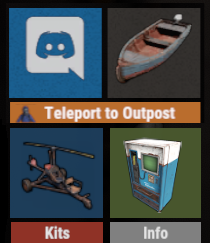
Create your own UI buttons for your rust server!
Plugin comes with built ingame editor which makes creating proccess so much easier!


• Features

- Create as many buttons as you want.
- Attach Images or Text to buttons.
- Set chat commands to each button.
- UI Editor ingame
- Toggle hide function to create small gui menu.


• Commands


Quote
/custombuttons - open ingame editor
/custombuttons_list - show list of all ui elements
/custombuttonstoggle - toggle hide/show of selected buttons

Commands can be changed to shorter version inside config file.

• Permissions

Quote
Every button has specific permission which is needed in order to see button.
custombuttons.<button-name>

Admin permission needed to open editor, user with this permission can also see all buttons created.
custombuttons.admin

• Config Example

Quote
{
"Hide Buttons": {
"When using Computer Station": [
"button_name",
"panel_name"

],
"When Player is dead": [
"*", → using * symbol basically means "all buttons"
"panel_name"

],
"When Player is looting": [
"button_name",
"panel_name"

]
},
"Base Position": { → starting point of buttons, afterward can be adjusted with offsets
"Anchor Min": "0.5 0.2",
"Anchor Max": "0.5 0.2"
}, QUICK TIP: by using 0.5 0.0 you will achieve complete button responsivity

"Font Settings": {
"Font Style": "robotocondensed-bold.ttf",
"Base Font Size": 13,
"Base Font Color": "1 1 1 1",
"Font Outline Color": "0 0 0 1",
"Font Outline Thickness": "0.1 0.1"
},
"Chat Commands": {
"Open GUI": "custombuttons",
"List all Panels": "custombuttons_list",
"Toggle buttons on/off": "custombuttonstoggle"
}
Expand

• Cui Data Example

Quote
{
"buttonName": {
"uiType": "Hud",
"panelType": "button",
"OffsetMin": "-50 -50",
"OffsetMax": "50 50",
"text": "Button Text",
"panelColor": "0.16 0.34 0.49 1.0",
"panelChatCmd": "chatcommand",
"imageUrl": "vending.machine.png",
"imgAnchorMin": "0 0",
"imgAnchorMax": "1 1",
"onCmdHide": "true"
}
}
Expand
Author
Just4Free
First release
Last update

Ratings

5.00 star(s) 2 ratings

More downloads from Just4Free

Latest Updates

  1. Update to 2.0.8

    What's New in Version forced wipe patch

Latest Reviews

nice plugin
Thanks J4F! As always!
Back