
Official page:

Custom Helicopter Tiers
Create and customize an unlimited number of patrol helicopter levels with different difficulties
 chaoscode.io
Take full control of the patrol helicopter and customize each of its aspects to your liking, creating an unlimited number of tiers with different difficulties. A great addition to both PVE and PVP servers.
Permissions
Understanding the Weighting System
1. Assigning Weights to Rarities
In this system, items are divided into different rarities: Common, Uncommon, Rare, and VeryRare. Each rarity is assigned a specific weight that determines how likely it is to be selected when loot is populated. Here's an example of how these weights are assigned:
"Common" has a weight of 5.
"Uncommon" has a weight of 3.
Both "Rare" and "VeryRare" have weights of 1.
When you add up these weights, you get a total of 10 (5 + 3 + 1 + 1 = 10). This means that out of these 10 items, if you were to randomly pick an item to spawn, you would have:
- 5 out of 10 (50%) chance of picking a "Common" item.
- 3 out of 10 (30%) chance of picking an "Uncommon" item.
- 1 out of 10 (10%) chance of picking a "Rare" item.
- 1 out of 10 (10%) chance of picking a "VeryRare" item.

2. Choosing Items Based on Rarity
Once a rarity is chosen based on its weight, a specific item from that rarity pool is randomly selected. This means that not only is the rarity randomized, but also the specific item within that rarity. Here's an example of how it works:
If the "Common" rarity is chosen, any item marked as "Common" in the loot table (e.g., "ammo.rocket.basic") can be found in the crate. Each item within the same rarity category has an equal chance of spawning.
Note:
- No item will spawn multiple times in a single crate.
Chat Commands
Console Commands
Permissions
- customhelicoptertiers.call.<Tier> - Allows using the heli.call chat commands for a specific helicopter
- customhelicoptertiers.call.all - Allows using the heli.call chat commands for all helicopters
- customhelicoptertiers.limits.<Name> - Assigns a set of command limits.
- customhelicoptertiers.admin - Allows using the admin commands
Understanding the Weighting System
1. Assigning Weights to Rarities
In this system, items are divided into different rarities: Common, Uncommon, Rare, and VeryRare. Each rarity is assigned a specific weight that determines how likely it is to be selected when loot is populated. Here's an example of how these weights are assigned:
JSON:
"Rarity Weights": {
    "Common": 5,
    "Uncommon": 3,
    "Rare": 1,
    "VeryRare": 1
}
"Common" has a weight of 5.
"Uncommon" has a weight of 3.
Both "Rare" and "VeryRare" have weights of 1.
When you add up these weights, you get a total of 10 (5 + 3 + 1 + 1 = 10). This means that out of these 10 items, if you were to randomly pick an item to spawn, you would have:
- 5 out of 10 (50%) chance of picking a "Common" item.
- 3 out of 10 (30%) chance of picking an "Uncommon" item.
- 1 out of 10 (10%) chance of picking a "Rare" item.
- 1 out of 10 (10%) chance of picking a "VeryRare" item.
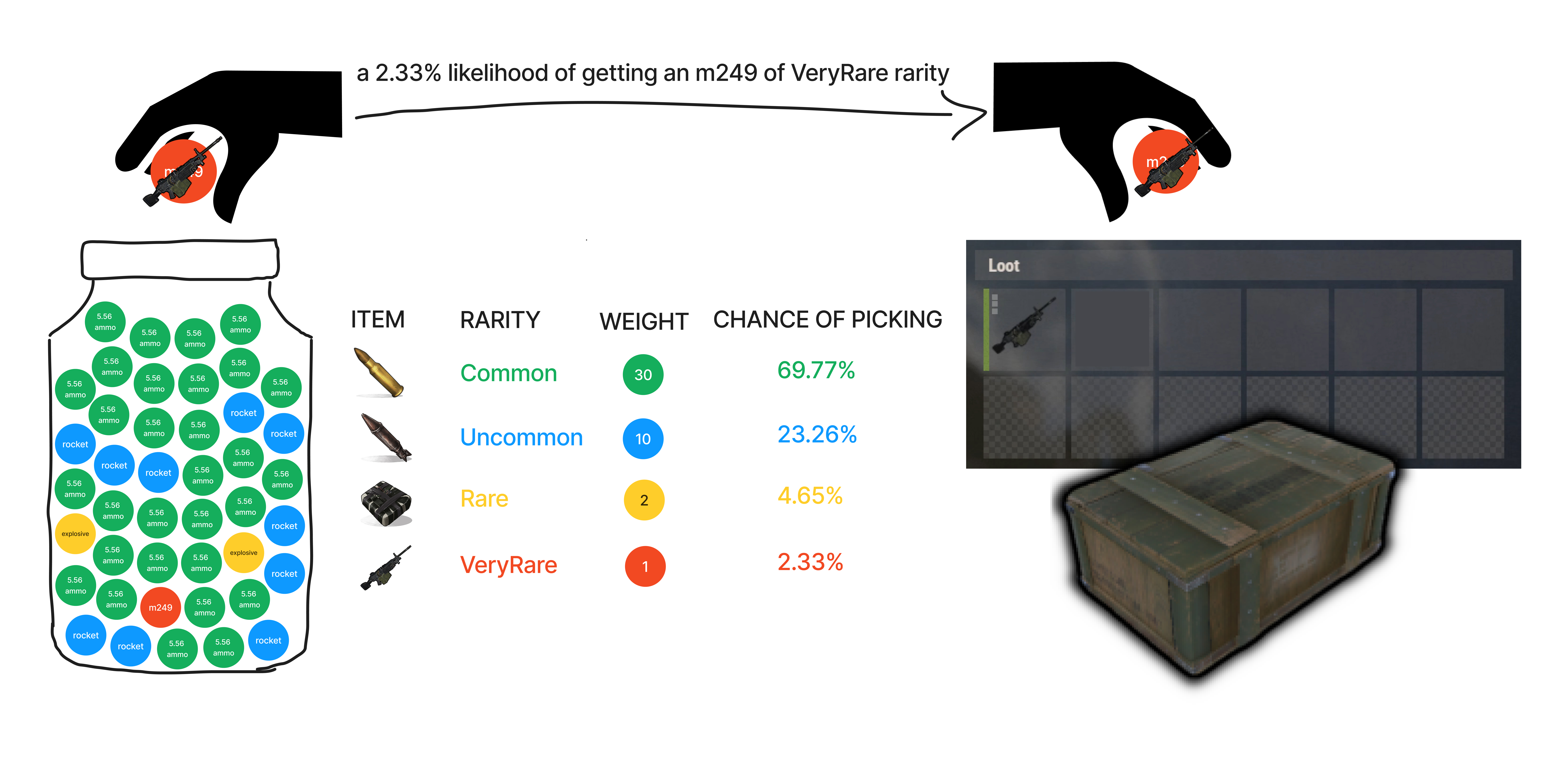
2. Choosing Items Based on Rarity
Once a rarity is chosen based on its weight, a specific item from that rarity pool is randomly selected. This means that not only is the rarity randomized, but also the specific item within that rarity. Here's an example of how it works:
JSON:
"Custom Loot Table": [
    {
        "Shortname": "ammo.rocket.basic",
        "Rarity": "Common"
    },
    {
        "Shortname": "explosives",
        "Rarity": "VeryRare"
    }
]
If the "Common" rarity is chosen, any item marked as "Common" in the loot table (e.g., "ammo.rocket.basic") can be found in the crate. Each item within the same rarity category has an equal chance of spawning.
Note:
- No item will spawn multiple times in a single crate.
Chat Commands
- heli.help - Prints all commands and their usage
- heli.call <Tier> - Spawns the helicopter from a random location
- heli.call <Tier> here - Calls the helicopter to your location
- heli.kill <Tier> - Kills the helicopter
- heli.kill all - Kills all active helicopters on the map
- heli.loot set <Tier> - Sets the loot table of the helicopter
- heli.spawn set <Spawn Point Name> <Position> - Sets a custom spawn point based on the coordinates
- heli.spawn set <Spawn Point Name> here - Sets a custom spawn point at your location
- heli.spawn delete <Spawn Point Name> - Deletes a custom spawn point
- heli.spawn show - Shows all created custom spawn points
- heli.delete <Tier> - Deletes a helicopter
- heli.add <Tier> - Adds a helicopter
- heli.list - Lists all created helicopters
Console Commands
- heli.call <Tier> - Spawns the helicopter from a random location
- heli.call <Tier> <Steam ID> - Calls the helicopter to the player's location
- heli.kill <Tier> - Kills the helicopter
- heli.kill all - Kills all active helicopters on the map
- heli.report - Prints a report of the helicopters


